Dify踩坑记录
Dify踩坑记录
首先感谢 Axton的视频,做的相当仔细,但好像有做了一些引流的屏蔽,并没有分享他的工作文件。
当然还有大神的开源项目translation-agent。
于是我自己动手做了一遍,并踩了一些坑,相信不是那么幸运的话,你也会碰到。
安装配置dify
1 | git clone https://github.com/langgenius/dify |
就这么简单,除了中间一些下载镜像的时间,并没有多大困难。打开之后需要一个setup,就是设置一下管理员账号和密码。

模型设定
我试了ollama+llama3.1和通义千问,从右上角账户的设定菜单进入,设置比较顺利的。
提醒一下,假如你用ollama,由于dify在docker中运行,你的ollama监听地址需要改成0.0.0.0(参考),地址配置成http://host.docker.internal:11434。

第一个工作流,反思翻译
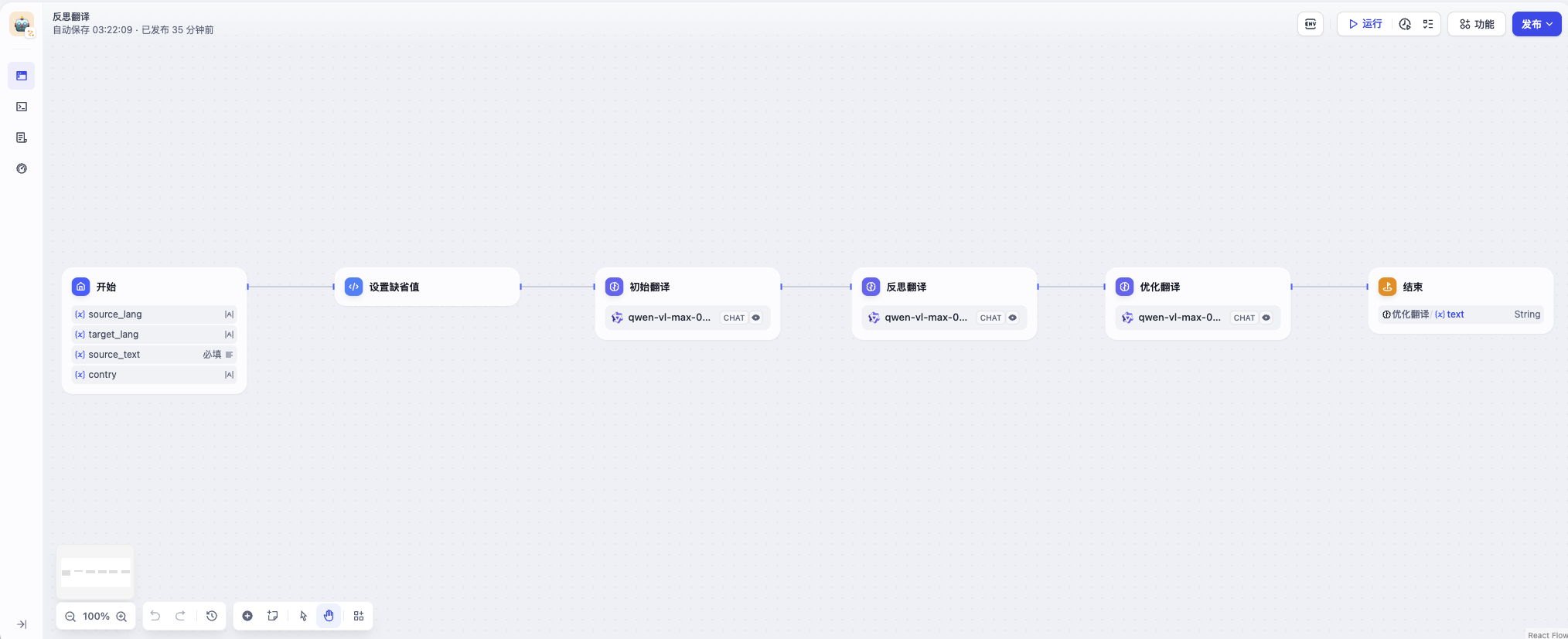
工作流有6步,开始,设定默认值,初始翻译,反思翻译,优化翻译,输出。1,2,6步骤都是常规步骤,初始翻译,反思,优化这三个步骤就是吴恩达老师的精髓。
开始节点,配置了输入参数,包括原语言,目标语言,原文本,国家区域(这个一个优化项)
默认参数节点,就是获取开始节点的输入,对于没有值的变量设置一个默认值。用python脚本实现,其余都差不多。
1 |
|
初始翻译,就是把原文扔给大模型,获取结果。[大括号里面是变量,每一个节点prompt分成两部分,一个system,一个user,下同]
1 | You are an expert linguist, specializing in translation |
1 | This is an {{#1727140378305.source_lang#}} to {{#1727140378305.target_lang#}} translation, please provide the {{#1727140134125.target_lang#}} translation for this text. Do not provide any explanations or text apart from the translation. |
Do not provide any explanations or text apart from the translation. 这个是个关键,告诉大模型只要翻译结果。
**反思翻译,**有点意思,就是让大模型根据初始翻译的结果来给出优化建议
1 | You are an expert linguist specializing in translation from {{#1727140378305.source_lang#}} to {{#1727140378305.target_lang#}}. |
1 | Your task is to carefully read a source text and a translation from {{#1727140378305.source_lang#}} to {{#1727140378305.target_lang#}}, and then give constructive criticisms and helpful suggestions to improve the translation. |
**优化翻译,**根据反思翻译的修改意见,大模型完成优化。
1 | You are an expert linguist, specializing in translation editing from {{#1727140378305.source_lang#}} to {{#1727140378305.target_lang#}}. |
1 | Your task is to carefully read, then edit, a translation from {{#1727140378305.source_lang#}} to {{#1727140378305.target_lang#}}, taking into |
输出节点,就是配置最终输出什么内容
实验
网上随便找点什么内容测试一下。
I have listed out few of them below and based on your budget, resources, technical skills you could either choose to setup your own or get some commercial. Some of the commercial products might allow a free trial account.
Self-Managed:
Cuckoo – Cuckoo or modified cuckoo does good job covering different OS platforms.
https://drakvuf.com/ – Unlike cuckoo, this is agentless. The setup for this is quiet involved but the results are great.
Sandboxie
Noriben (not exactly a sandbox but does a decent job in Behavioural) – A python script which montiors via ProcMon. Simple easy to setup in a VM. Again not exactly a Sandbox and you would miss out on lot of memory related things.
Hosted/Commercial
Hybrid Analysis (Not sure for Student if they give a free base account)
app.any.run
VMRay (according to me one of the best Commercial Sandbox offering)
我已经在下面列出了其中的一些选项,根据您的预算、资源和技术技能,您可以选择自己设置或购买一些商业产品。一些商业产品可能允许免费试用帐户。
自我管理:
Cuckoo – Cuckoo 或修改后的 Cuckoo 在支持不同的操作系统平台方面表现出色。
https://drakvuf.com/ – 与 Cuckoo 不同,这是一个无代理的解决方案。设置过程虽然复杂,但结果非常出色。
Sandboxie
Noriben(不完全是沙盒,但在行为分析方面表现出色)– 一个通过 ProcMon 监控的 Python 脚本。在虚拟机中设置简单易行。然而,这不完全是沙盒,您可能会错过很多与内存相关的信息。
托管/商业
Hybrid Analysis(不确定学生是否可以获得免费基础账户)
app.any.run
VMRay(据我所知,这是最好的商业沙盒之一)
整体翻译效果还不错。
附录
如何修改ollama监听地址
1 | ollama serve --help |
或者
1 | aunchctl setenv OLLAMA_HOST "0.0.0.0" |